Category: Mac Utilities

  • AnyTrans for Android 7.3.0.20200722 for Mac

    AnyTrans for Android 7.3.0.20200722 for Mac

    AnyTrans for Android 7.3.0.20200722 for Mac

    AnyTrans for Android 7.3.0.20200722 for Mac

    Mac Utilities
    Updated Nov 6, 2026
    Mac Utilities • Updated Nov 6, 2026

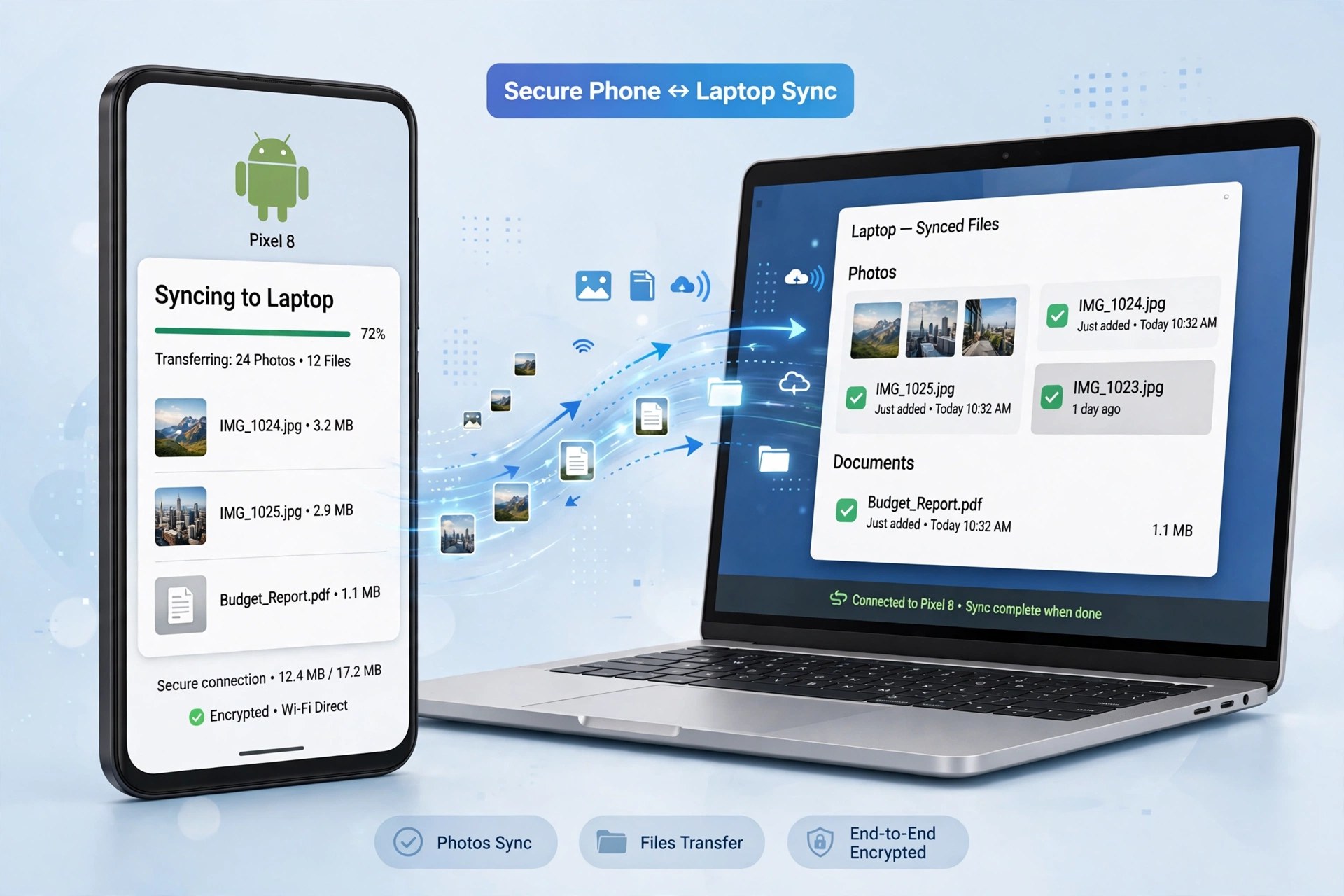
    AnyTrans for Android was iMobie's Mac companion for Android phones and tablets, and the 7.3.0 build dated July 2020 is one of its later releases under that name. One important update for anyone looking for it today: iMobie has since renamed this product AnyDroid, and the official page now presents AnyDroid as "originally AnyTrans for Android." The job it does is unchanged — managing an Android device's content from your Mac instead of digging through folders by hand.

    From the Mac app you can move photos, music, videos, contacts, messages, call logs, calendars, books, and documents between an Android device and your computer, back content up, and even move data from an iOS device over to Android. iMobie sells it as paid software with a free trial download; the trial is limited compared with the activated version, so treat it as a way to test your device connection first.

    Key Features

    • Transfer photos, music, videos, contacts, and messages between Android and Mac
    • Back up Android content to your computer in one place
    • Move data from iPhone or iPad across to an Android device
    • Batch install, uninstall, and back up Android apps
    • Works with Android 5.0 and above from the major phone brands

    How to Download

    1. Open iMobie's official page — AnyTrans for Android now lives there under its new name, AnyDroid.
    2. Start your download from the official site: Download from the official site
    3. Install the Mac app, connect your Android device, and follow the on-screen setup to start the free trial.

    Why is it called AnyDroid now?
    iMobie renamed AnyTrans for Android to AnyDroid. The official AnyDroid page confirms it is the same Android manager, so current downloads use the new name.

    Is AnyTrans for Android free?
    It offers a free trial with limited transfers. Full use requires a paid license from iMobie — there is no free full version.

  • AnyToISO Professional 3.9.4 for Mac

    AnyToISO Professional 3.9.4 for Mac

    AnyToISO Professional 3.9.4 for Mac

    AnyToISO Professional 3.9.4 for Mac

    Mac Utilities
    Updated Nov 6, 2026
    Mac Utilities • Updated Nov 6, 2026

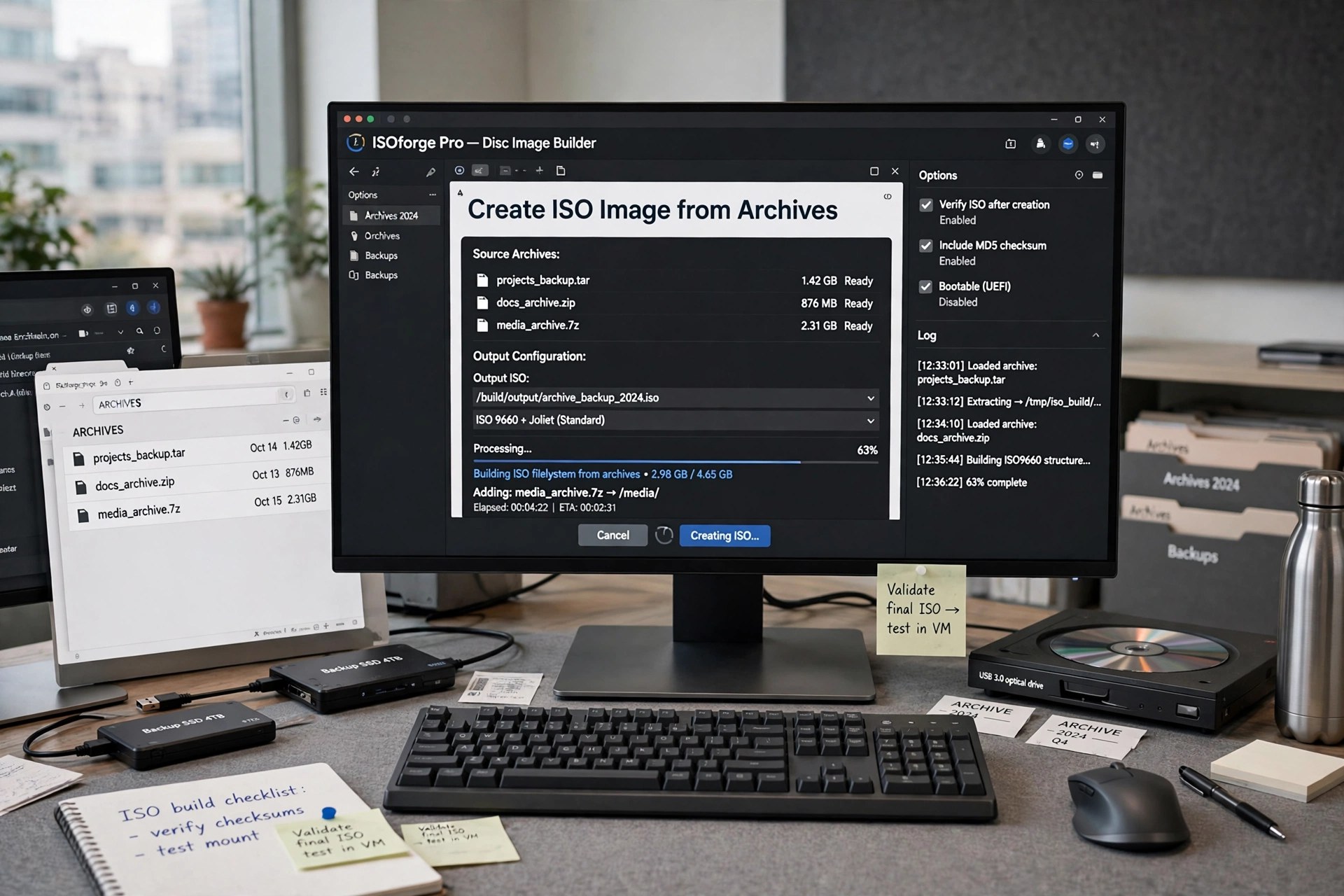
    AnyToISO Professional is the name CrystalIDEA uses for the fully licensed tier of its long-running ISO utility, and version 3.9.4 for Mac is an earlier release of that same Professional line. A note on naming: CrystalIDEA uses "Pro" and "Professional" for the same paid upgrade — its own upgrade page describes buying the Pro license as upgrading to AnyToISO Professional — so this listing is not a different converter with separate features. It is the full, unlocked edition of AnyToISO for people who work with disk images every day.

    As the Professional edition, it converts and extracts images of any size, creates ISO files from CD, DVD, and Blu-ray discs, and works with password-protected archives. Professional customers also receive the highest priority in technical support, which matters when an image conversion is blocking real work. The Mac build keeps the Finder integration and command-line access that make the tool easy to slot into an existing workflow.

    Key Features

    • Full Professional license with no file size limitations
    • Create ISO images from CD, DVD, and Blu-ray discs
    • Convert or extract DMG, BIN, NRG, MDF, 7Z, RAR, ZIP, PKG, and more
    • Highest-priority technical support from CrystalIDEA
    • Finder integration and command-line mode for batch work

    How to Download

    1. Head to CrystalIDEA's official AnyToISO page for the Mac version.
    2. Start your download from the official site: Download from the official site
    3. Install the app, then register it with a Professional license code to unlock every feature.

    Is Professional different from Pro?
    Not in features. CrystalIDEA uses both names for the same paid license that unlocks the Lite app, so a Pro or Professional key activates the identical full edition.

    What does the free Lite edition leave out?
    Lite is capped at 870 MB files and cannot create ISO images from physical discs. The Professional license removes the size cap and enables disc-to-ISO creation.

  • AnyToISO Pro 3.9.6 for Mac

    AnyToISO Pro 3.9.6 for Mac

    AnyToISO Pro 3.9.6 for Mac

    AnyToISO Pro 3.9.6 for Mac

    Mac Utilities
    Updated Nov 6, 2026
    Mac Utilities • Updated Nov 6, 2026

    AnyToISO Pro is the paid edition of CrystalIDEA's image converter, and its headline difference is simple: no file size limit. Where the free Lite edition stops at CD-sized files of 870 MB, the Pro license registered in version 3.9.6 for Mac converts and extracts images of any size, including full DVD and Blu-ray images. It also adds the ability to create an ISO directly from a physical CD, DVD, or Blu-ray disc, which the Lite edition cannot do.

    Everything else Mac users like about the base app carries over — the same wide format support, Finder integration, and command-line mode — because Pro is not a separate program. You download the standard AnyToISO app from CrystalIDEA, buy a Pro license, and enter the registration code to unlock the full version instantly. A license is purchased per computer, with volume discounts and a discount when buying for both Windows and Mac.

    Key Features

    • No file size limitations on converting or extracting images
    • Create ISO images from CD, DVD, and Blu-ray discs
    • Same broad format support: DMG, BIN, NRG, MDF, 7Z, RAR, ZIP, and more
    • Instant unlock — enter the emailed license code in the Lite app
    • Finder integration and command-line mode included

    How to Download

    1. Download AnyToISO for Mac from CrystalIDEA, then open CrystalIDEA's Pro upgrade page.
    2. Start your download from the official site: Download from the official site
    3. Buy the Pro license, then enter the registration code from your email to activate the full version.

    How is Pro different from the free Lite edition?
    Lite is limited to files up to 870 MB. Pro removes that limit entirely and can also create ISO images from physical CD, DVD, and Blu-ray discs.

    Do I need a separate Pro installer?
    No. Pro is a license upgrade for the standard app. Install AnyToISO, then enter your registration code to unlock it.

  • AnyToISO 3.9.7 for Mac

    AnyToISO 3.9.7 for Mac

    AnyToISO 3.9.7 for Mac

    AnyToISO 3.9.7 for Mac

    Mac Utilities
    Updated Nov 6, 2026
    Mac Utilities • Updated Nov 6, 2026

    AnyToISO from CrystalIDEA solves a small but stubborn problem: disk images arrive in dozens of formats, while virtual machines, burners, and many tools only speak ISO. On the Mac, version 3.9.7 converts images and archives — including DMG, BIN, NRG, MDF, IMG, and 7Z, RAR, ZIP, and PKG files — into a standard ISO, or simply extracts their contents to a folder. Converting a DMG to ISO, for example, makes a macOS image mountable inside VMware, Parallels, or VirtualBox.

    The app integrates with Finder, so converting or extracting a supported file is a right-click away, and a command-line mode is available for batch jobs. CrystalIDEA offers AnyToISO as a free Lite edition limited to files up to normal CD size (870 MB); larger DVD and Blu-ray images require the paid Pro license. That honest split makes the Lite edition a genuinely useful free trial for smaller images.

    Key Features

    • Convert disk images and archives to standard ISO in one click
    • Extract ISO and many other image formats to a local folder
    • Supports DMG, BIN, NRG, MDF, IMG, 7Z, RAR, ZIP, PKG, and more
    • Finder integration for convert and extract actions
    • Command-line support for batch operations on macOS

    How to Download

    1. Go to CrystalIDEA's official AnyToISO page and download the macOS version.
    2. Start your download from the official site: Download from the official site
    3. Open the download, install AnyToISO, and convert your first image from Finder or the app window.

    Is AnyToISO free?
    The Lite edition is free but only handles files up to 870 MB. Working with DVD or Blu-ray sized images requires the paid Pro license.

    Can it convert a DMG to ISO?
    Yes. DMG conversion is one of its main uses, handy when you need to mount a Mac image in a virtual machine that accepts ISO files.

  • AnyMP4 iPhone Unlocker 1.3.62 for Mac

    AnyMP4 iPhone Unlocker 1.3.62 for Mac

    AnyMP4 iPhone Unlocker 1.3.62 for Mac

    AnyMP4 iPhone Unlocker 1.3.62 for Mac

    Mac Utilities
    Updated Nov 6, 2026
    Mac Utilities • Updated Nov 6, 2026

    AnyMP4 iPhone Unlocker 1.3.62 for Mac is a last-resort tool for your own iPhone, iPad or iPod when you are locked out: a forgotten 4- or 6-digit passcode, Face ID or Touch ID that no longer works, a disabled phone after too many attempts, or a second-hand device still tied to a previous setup. Run from your Mac, it downloads the matching firmware and removes the screen lock so the device can be set up again.

    Be clear about the cost: wiping a passcode erases all data and settings on the device, so restore from a backup afterwards. Only use this on devices you own. The software is paid, with a free trial that walks through detection and the unlocking steps; completing an unlock requires a licence.

    Key Features

    • Wipe Passcode removes 4-digit, 6-digit, Face ID and Touch ID locks, including on disabled devices
    • Remove Apple ID lets you clear an old account from your own device and activate it with a new one
    • Bypass Screen Time retrieves or removes a forgotten restrictions passcode without data loss
    • Remove MDM lifts Mobile Device Management restrictions from iPhone and iPad
    • Also removes iTunes backup encryption settings and offers SIM unlock to switch carriers

    How to Download

    1. Back up the device if you still can, and confirm it is yours — unlocking erases its data.
    2. Start your download from the official site: Download from the official site
    3. Install it on your Mac, connect the device by USB, choose a mode such as Wipe Passcode, and follow the firmware steps.

    Is AnyMP4 iPhone Unlocker free?
    No. The free trial detects your device and previews the process, but actually unlocking requires a paid licence. It is not a free full version.

    Will unlocking delete my data?
    For a screen passcode, yes — removing the lock erases the device completely, exactly as Apple's own restore does. Screen Time removal is the exception and keeps your data.

  • AnyMP4 iPhone Transfer Pro 9.0.72 for Mac

    AnyMP4 iPhone Transfer Pro 9.0.72 for Mac

    AnyMP4 iPhone Transfer Pro 9.0.72 for Mac

    AnyMP4 iPhone Transfer Pro 9.0.72 for Mac

    Mac Utilities
    Updated Nov 6, 2026
    Mac Utilities • Updated Nov 6, 2026

    AnyMP4 iPhone Transfer Pro 9.0.72 for Mac is an iTunes alternative for people who want to move files, not sync entire libraries. From your Mac you can copy photos, music, videos, contacts, messages, ringtones, audiobooks, eBooks and playlists between an iPhone, iPad or iPod, your computer and iTunes — in any direction, and selectively, without overwriting what is already on the device.

    Beyond copying, it manages the library itself: edit contacts and merge duplicates, organise photos into albums, fix music ID3 tags, convert media and HEIC images to formats other devices can open, and even make ringtones from your own songs. It is paid software; the free trial limits how much you can transfer, and a licence removes those caps.

    Key Features

    • Transfers files between iOS devices, Mac and iTunes without overwriting existing data
    • Manages contacts: add, edit, group, delete and merge duplicates directly from your Mac
    • Organises photos and converts HEIC images to JPG or PNG during export
    • Edits ID3 tags, builds playlists and creates custom ringtones from music files
    • Backs up SMS, iMessages and app chats from WhatsApp, LINE, Viber and others to the computer

    How to Download

    1. Connect your iPhone to your Mac with its cable and unlock it so the device can be detected.
    2. Start your download from the official site: Download from the official site
    3. Install the Mac version, let it scan your library, and test a small transfer in the free trial before registering.

    Is AnyMP4 iPhone Transfer Pro free?
    No. The free trial is limited in the number of files and transfers. Full, unrestricted moving and management require a paid licence — there is no free full version.

    Does it replace iTunes completely?
    For everyday file transfer and library management, largely yes. You will still want Finder or iTunes for full device backups, restores and iOS updates, which this tool does not do.

  • AnyMP4 iPhone GPS Spoofer 1.0.18 for Mac

    AnyMP4 iPhone GPS Spoofer 1.0.18 for Mac

    AnyMP4 iPhone GPS Spoofer 1.0.18 for Mac

    AnyMP4 iPhone GPS Spoofer 1.0.18 for Mac

    Mac Utilities
    Updated Nov 6, 2026
    Mac Utilities • Updated Nov 6, 2026

    AnyMP4 iPhone GPS Spoofer 1.0.18 for Mac lets an iPhone report a different location from the one it is actually in. Connect the phone to your Mac by USB, click a point on the map, and location-based apps see that virtual spot instead. People use it to protect their privacy when sharing location, test location features in apps they are developing, or explore location-based games from home.

    Use it only on your own iPhone, and be aware that spoofing can breach the terms of some games and services, which may restrict accounts that do it. The program is paid software sold by AnyMP4 with a free download to try the connection and interface; full location-changing features require a licence after the trial limits.

    Key Features

    • One-click location change: pick any spot on the map and your iPhone reports it instantly
    • One-stop and Multi-stop modes simulate movement along a route at a speed you set
    • Joystick Mode moves the virtual location freely with keyboard or mouse controls
    • Save favourite routes and review or clear your location-changing history
    • Pause movement at any time, with no jailbreak required on the iPhone

    How to Download

    1. Decide which of your own devices and apps you will test, and check that app's terms first.
    2. Start your download from the official site: Download from the official site
    3. Install it on your Mac, connect your iPhone by USB, tap Trust, and try changing location from the map view.

    Is AnyMP4 iPhone GPS Spoofer free?
    No. There is a free trial download with limited use, but it is paid software overall. A licence unlocks continued location changing and route simulation.

    Will apps ban me for spoofing my location?
    They can. Some games and services treat fake GPS as cheating and may warn or ban accounts. Spoof only on your own device, and accept that risk before using it in any competitive game.

  • AnyMP4 iPhone Data Recovery 9.1.20 for Mac

    AnyMP4 iPhone Data Recovery 9.1.20 for Mac

    AnyMP4 iPhone Data Recovery 9.1.20 for Mac

    AnyMP4 iPhone Data Recovery 9.1.20 for Mac

    Mac Utilities
    Updated Nov 6, 2026
    Mac Utilities • Updated Nov 6, 2026

    AnyMP4 iPhone Data Recovery 9.1.20 for Mac is the tool you reach for after the damage is done: photos deleted by mistake, messages lost in a failed update, or contacts gone when a phone was damaged, lost or locked. Working from your Mac, it scans an iPhone, iPad or iPod directly, or extracts what you need from an existing iTunes or iCloud backup without restoring the whole phone.

    The preview-first workflow is its strongest point — you see exactly which photos, chats, call logs and notes were found before paying to save them. The program itself is paid software; the free trial scans and previews, and a licence is required to actually recover files to your Mac.

    Key Features

    • Three recovery modes: from the iOS device, from an iTunes backup, or from an iCloud backup
    • Restores photos, messages, contacts, videos, notes, call history, WhatsApp data and more
    • Previews existing and deleted items by category before you choose what to recover
    • Helps after accidental deletion, water damage, system crashes, forgotten passcodes and broken screens
    • Exports recovered files to your Mac instead of overwriting the phone's current data

    How to Download

    1. Put the affected iPhone aside and avoid taking new photos or messages that could overwrite deleted data.
    2. Start your download from the official site: Download from the official site
    3. Install it on your Mac, connect the device or sign in to pick a backup, run a scan and preview the results in the free trial.

    Is AnyMP4 iPhone Data Recovery free?
    No. Scanning and previewing are free in the trial, but saving recovered files requires a paid licence. Any site offering a free full version is not official.

    Do I need the phone itself to recover data?
    Not always. If you have an iTunes or iCloud backup, the Mac app can extract photos, messages and contacts from that backup even if the phone is lost or broken.

  • AnyMP4 iOS Toolkit 9.0.58 for Mac

    AnyMP4 iOS Toolkit 9.0.58 for Mac

    AnyMP4 iOS Toolkit 9.0.58 for Mac

    AnyMP4 iOS Toolkit 9.0.58 for Mac

    Mac Utilities
    Updated Nov 6, 2026
    Mac Utilities • Updated Nov 6, 2026

    AnyMP4 iOS Toolkit 9.0.58 for Mac is not a single tool but a bundle, gathering AnyMP4's main iPhone utilities behind one interface on your Mac. Its centrepiece is iPhone Data Recovery, which restores deleted photos, messages, contacts, notes and more from the device itself, an iTunes backup or an iCloud backup. Around it sit iOS System Recovery, iOS Data Backup and Restore, and WhatsApp Transfer for iOS.

    That makes the toolkit most useful after something has already gone wrong: a failed update, a phone stuck on the Apple logo, or an accidental deletion with no recent backup. It is commercial software with a free trial that previews what can be recovered; actually saving files and completing repairs requires registration with a paid licence.

    Key Features

    • Recovers up to 20 data types from an iOS device, iTunes backup or iCloud backup, with preview before you restore
    • iOS System Recovery fixes phones stuck in recovery mode, DFU mode, headphone mode or on a black or frozen screen
    • Data Backup and Restore works as a selective iTunes alternative for contacts, messages, photos and media
    • WhatsApp Transfer moves chats, photos, videos and attachments between iPhone and iPad devices
    • Standard repair mode aims to fix system problems without data loss; Advanced mode handles tougher cases

    How to Download

    1. Connect your iPhone to your Mac with a cable you trust, and stop using the phone if you hope to recover deleted files.
    2. Start your download from the official site: Download from the official site
    3. Install the toolkit, choose the module you need, and use the free trial scan to preview recoverable data before buying.

    Is AnyMP4 iOS Toolkit free?
    No. The free trial lets you scan and preview, but recovery, repair and transfer functions need a paid licence. There is no free full version.

    Can it recover data with no backup at all?
    Often, yes — it can scan the device directly for deleted items. Success depends on whether iOS has overwritten that space since deletion, so scan as soon as possible.

  • AnyMP4 iOS Cleaner 1.0.30 for Mac

    AnyMP4 iOS Cleaner 1.0.30 for Mac

    AnyMP4 iOS Cleaner 1.0.30 for Mac

    AnyMP4 iOS Cleaner 1.0.30 for Mac

    Mac Utilities
    Updated Nov 4, 2026
    Mac Utilities • Updated Nov 4, 2026

    AnyMP4 iOS Cleaner 1.0.30 for Mac runs on your Mac and cleans the iPhone, iPad or iPod you connect to it. When storage fills up with app caches, crash logs, temporary downloads and oversized videos, the program scans the device, shows what is taking space, and lets you remove junk, uninstall unwanted apps and clear out large files selectively instead of guessing inside Settings.

    It also handles the serious end of cleaning: a permanent erase for when you sell or give a device away, with three security levels up to a DoD 5220.22-M wipe for private data. The software is paid, with a free trial that covers limited features only — full cleaning and erasing require a licence, starting with short-term and lifetime options on the official store.

    Key Features

    • Quick scan that finds junk files, caches, invalid files and crash logs to free up space fast
    • Deletes large files and bulk photos, with backup and lossless compression before you remove pictures
    • Uninstalls unwanted apps from the Mac screen, including rarely used and oversized ones
    • Erase All Data and Erase Private Data modes with Low, Middle and High security levels
    • Shows device capacity, used and free space up front, for iPhone, iPad and iPod

    How to Download

    1. Back up your iPhone first, especially if you plan to use any erase feature.
    2. Start your download from the official site: Download from the official site
    3. Install it on your Mac, connect your device by cable, tap Trust, and run a Quick Scan from the free trial.

    Is AnyMP4 iOS Cleaner free?
    No. There is a free trial with limited features, but it is not a free full version. Cleaning large files, compressing photos and permanent erasing need a paid licence.

    Can erased data be recovered afterwards?
    No, and that is the point of the erase modes. The Middle and High levels overwrite data so it cannot be recovered, so always back up anything you still need first.