Category: Mac Utilities

  • Prey 1.13.42 for Mac

    Prey 1.13.42 for Mac

    Prey 1.13.42 for Mac

    Prey 1.13.42 for Mac

    Mac Utilities
    Updated Aug 12, 2026
    Mac Utilities • Updated Aug 12, 2026

    Prey is protection you install before anything goes wrong. This small agent sits quietly on your MacBook until the day it is lost or taken. Then you sign in to the online panel, mark the device as missing, and Prey starts sending reports with its location, nearby network details and, where permitted, pictures and screenshots. From the same panel you can sound an alarm or lock the screen while you work on getting it back.

    Key Features

    • Location tracking for your Mac from a single online control panel
    • Missing reports with location history, pictures and screenshots
    • Remote screen lock and a loud alarm to scare off a thief
    • Groups, labels and automations for people managing several devices
    • One account covers laptops, phones and tablets across platforms

    How to Download

    1. Use the download button on this page, or Download from the official site to get the Mac installer.
    2. Run the package and sign in, or create your free Prey account during setup.
    3. Grant the Location, Camera and Full Disk Access permissions macOS asks for.

    System Requirements

    Prey runs on current macOS releases on Intel and Apple Silicon Macs and needs an internet connection to report in. A Prey account is required, and the agent updates itself in the background.

    FAQs

    Is Prey free?

    A free plan covers personal use on a small number of devices. Paid plans add more devices, faster reporting and fleet tools for organisations.

    Can Prey find a Mac that is switched off?

    No tool can reach a powered off machine. Prey reports as soon as the Mac wakes and connects, and keeps a location history from before.

    Does Prey watch me all the time?

    No. It stays idle until you mark the device missing or request a report, and camera use follows the permissions you granted.


  • Network Kit 9.3.0 for Mac

    Network Kit 9.3.0 for Mac

    Network Kit 9.3.0 for Mac

    Network Kit 9.3.0 for Mac

    Mac Utilities
    Updated Aug 12, 2026
    Mac Utilities • Updated Aug 12, 2026

    When a connection crawls or a printer vanishes, guessing wastes time. Network Kit puts the checks you actually reach for into one window on your Mac. Scan the local network to see which devices are online, ping a host, trace the route a connection takes, and look up DNS records without opening Terminal. It suits home users sorting out Wi Fi trouble and small office staff who need quick answers.

    Key Features

    • LAN scan that lists devices on your local network with addresses and names where available
    • Ping and traceroute tools that show latency and the path traffic takes to a host
    • Port scan and service checks to confirm whether a server or app is really listening
    • DNS lookup and network information panels for addresses, gateways and interfaces
    • Clean Mac interface that presents results in plain tables, not raw terminal output

    How to Download

    1. Use the download button on this page to get the Mac installer package.
    2. Open the downloaded file and move Network Kit into your Applications folder.
    3. Launch the app, allow local network access if macOS asks, and run your first scan.

    System Requirements

    Network Kit runs on recent versions of macOS on Intel and Apple Silicon Macs. It needs a network connection for scans, and local network permission in system settings for device discovery.

    FAQs

    Does Network Kit replace the tools in Terminal?

    For everyday checks, yes. It covers ping, traceroute and DNS lookup visually, though advanced users may still prefer Terminal for scripting.

    Why does the LAN scan show no device names?

    Some devices do not broadcast a name, and routers can limit discovery. The scan still shows addresses, usually enough to identify a device.

    Is Network Kit only for experts?

    No. The layout is simple for home troubleshooting, while the detail still helps support staff.

  • XLN Audio XO Complete 1.8.10 for Mac

    XLN Audio XO Complete 1.8.10 for Mac

    XLN Audio XO Complete 1.8.10 for Mac

    XLN Audio XO Complete 1.8.10 for Mac

    Mac Utilities
    Updated Aug 12, 2026
    Mac Utilities • Updated Aug 12, 2026

    XO changes how you find drum sounds. Instead of digging through folders, it plots your one shot samples on a visual map, grouped by how they actually sound, so similar kicks, snares and hats sit next to each other. You listen, click and swap until the kit feels right. The Complete edition pairs that workflow with the full core library and every current expansion in one package.

    Key Features

    • Space view sorts one shot samples by sonic similarity
    • Built in sequencer with Groove Templates and the Accentuator
    • Per lane editing with envelopes, filtering and effects
    • Export audio or MIDI with simple drag and drop into your DAW
    • Complete bundle adds all 35 expansions to the core library

    How to Download

    1. Use the download button on this page to get the installer.
    2. You can also Download from the official site to see the bundle options at XLN Audio.
    3. Run the XLN installer, sign in, install XO and its content, then open it in your host or standalone.

    System Requirements

    XO needs macOS 10.13 or later on a 64 bit Mac and an internet connection during installation. It runs as a VST, AU and AAX plugin and standalone, and the sample library needs generous free disk space.

    FAQs

    Can XO use my own samples?

    Yes. Point it at your folders and it adds your one shot samples to the map, sorted by sound next to similar factory samples.

    What does Complete add over standard XO?

    Standard XO ships with the core content of more than 8700 samples and over 240 beat presets. Complete includes that same core plus all 35 expansions.

    Does XO only work inside a DAW?

    No. XO also runs as a standalone application, which is handy for sketching beats before you open a full session.

  • ElectronMail 5.3.10 for Mac

    ElectronMail 5.3.10 for Mac

    ElectronMail 5.3.10 for Mac

    ElectronMail 5.3.10 for Mac

    Mac Utilities
    Updated Aug 12, 2026
    Mac Utilities • Updated Aug 12, 2026

    ElectronMail is an open source, unofficial desktop client for Proton Mail. It wraps the Proton web clients into a proper Mac application and adds the things a browser tab cannot do well. Your mail can live in an encrypted local store, so messages stay readable and searchable while you are offline, and several Proton accounts sit side by side in one window.

    Key Features

    • Full text search that also scans the body of your messages
    • Encrypted local store for offline reading and message export
    • Multiple Proton accounts in one app, each with its own settings
    • Tray icon with unread counts plus native notifications per account
    • Dark mode, spell checking and batch export of mail to EML files

    How to Download

    1. Use the download button on this page, or Download from the official site to open the project page.
    2. Pick the Mac package for your chip, Intel or Apple Silicon, from the releases.
    3. Move ElectronMail into Applications, open it and sign in to your Proton account.

    System Requirements

    ElectronMail runs on macOS on both Intel and Apple Silicon Macs, with separate download packages for each. You need a Proton Mail account, and some features such as the local store are switched on per account.

    FAQs

    Is ElectronMail made by Proton?

    No. It is an independent open source project that packages the official Proton web clients. Your sign in still goes to Proton itself.

    Can I read my mail offline?

    Yes, once the local store is enabled for an account. Message bodies are kept in an encrypted database that you can search and export.

    Does it support more than one account?

    Yes. Add several accounts, set a proxy or custom style per account, and see one combined unread count in the tray.

  • Smart Remesh 3.0 for Mac

    Smart Remesh 3.0 for Mac

    Smart Remesh 3.0 for Mac

    Smart Remesh 3.0 for Mac

    Mac Utilities
    Updated Aug 12, 2026
    Mac Utilities • Updated Aug 12, 2026

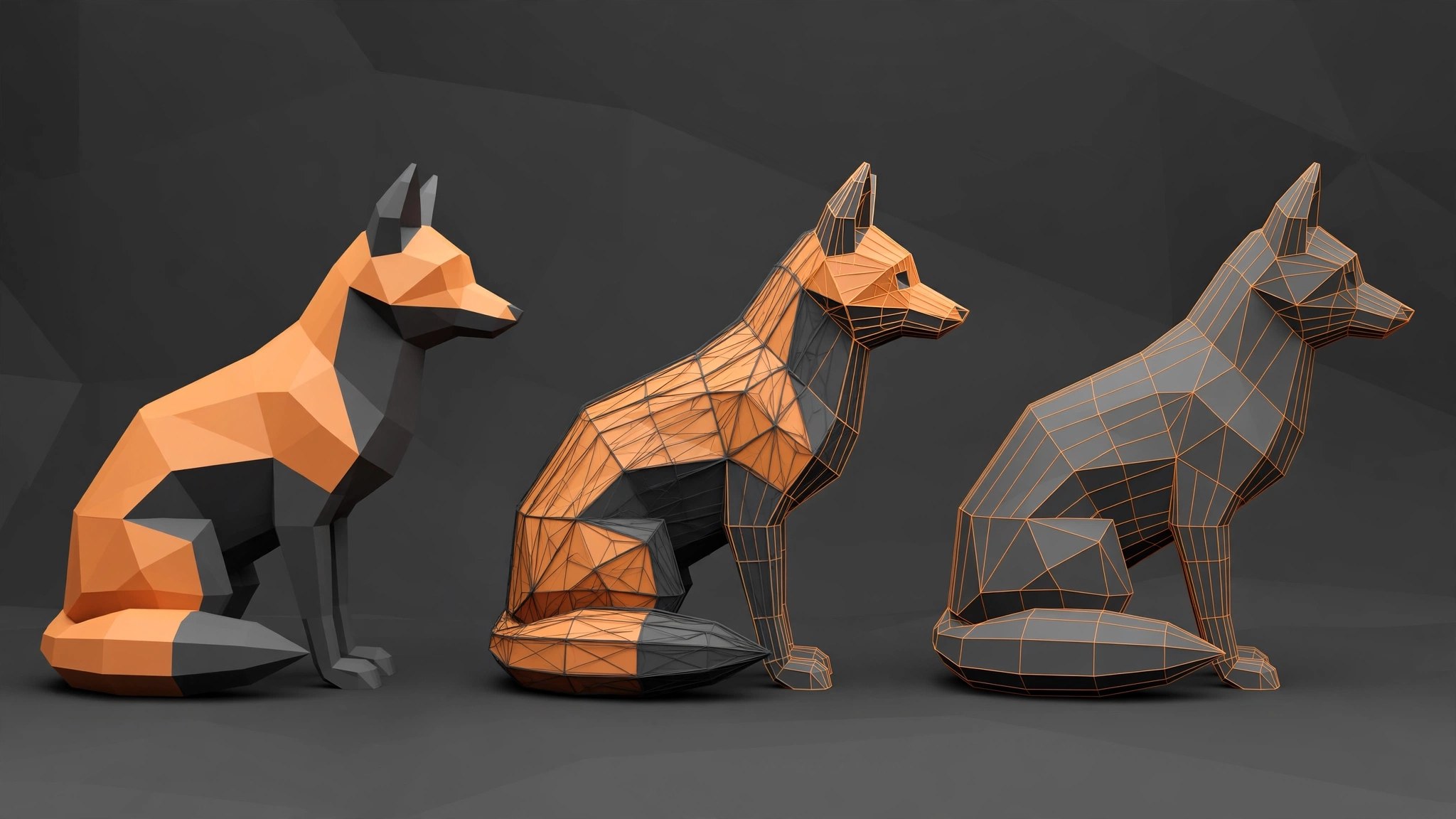
    Scanned models and AI generated meshes often arrive with hundreds of thousands of tangled triangles. Cleaning them by hand can eat a day. Smart Remesh is a Blender add on by Milad Kambari, sold through Superhive, that rebuilds such models automatically. One mode is tuned for organic shapes, another for hard surface work, where flat panels become clean single faces.

    Key Features

    • Separate organic and hard surface modes so the rebuild matches the kind of model you feed it
    • Rebuilds flat panels as clean n gons and removes edge loops that carry no shape
    • Produces mostly quad based geometry that is easier to edit, rig and animate
    • Drives polygon counts down hard for games and AR while keeping the silhouette
    • Works inside Blender on Mac, with no round trip to an external app

    How to Download

    1. Use the download button on this page to get the add on package for Mac.
    2. In Blender, open Preferences, choose Add ons, install the package and enable Smart Remesh.
    3. Select your mesh, pick organic or hard surface mode, set a target density and run the remesh.

    System Requirements

    Smart Remesh needs Blender 4.2 or newer on macOS, on Apple Silicon or Intel Macs. Very dense meshes benefit from more memory, since the rebuild runs locally.

    FAQs

    Does Smart Remesh preserve the shape of my model?

    That is the aim. Hard surface mode keeps flat panels and sharp form, while organic mode lays an even quad grid over curved surfaces.

    Can I use the result in a game engine?

    Yes. Lower counts with cleaner topology are what game and AR work needs, and you can export the rebuilt mesh from Blender as usual.

    Is this a standalone app?

    No. Smart Remesh is a Blender add on, so you need Blender installed on your Mac first.

  • Alfred 5 Powerpack 5.8.1 for Mac

    Alfred 5 Powerpack 5.8.1 for Mac

    Alfred 5 Powerpack 5.8.1 for Mac

    Alfred 5 Powerpack 5.8.1 for Mac

    Mac Utilities
    Updated Aug 12, 2026
    Mac Utilities • Updated Aug 12, 2026

    Alfred puts your whole Mac a few keystrokes away. Press a hotkey, start typing, and you can launch apps, find files, run web searches and trigger commands without touching the mouse. The Powerpack unlocks the deeper half of the app: workflows that chain actions together, a clipboard history that remembers what you copied, and snippets that expand short codes into full text.

    Key Features

    • Launch apps and find files from one fast hotkey search box
    • Workflows link hotkeys, keywords and actions with no code needed
    • Clipboard History finds text, images and files you copied earlier
    • Snippets expand short abbreviations into full pieces of text
    • System commands, music control and custom web searches built in

    How to Download

    1. Use the download button on this page to get the Alfred installer.
    2. You can also Download from the official site to get Alfred straight from its maker.
    3. Open the download, move Alfred to Applications, launch it and enter your Powerpack licence in Preferences.

    System Requirements

    Alfred 5 runs on macOS 10.14 or later, and the 5.8 line includes tuning for the newest macOS releases. It is a small, light app that stays out of your way until called.

    FAQs

    Is Alfred free to use?

    The core app is free forever for searching, launching and basic tasks. The Powerpack is a paid licence that unlocks workflows, clipboard history, snippets and themes.

    Do I need a separate download for the Powerpack?

    No. There is one Alfred app. Buying a Powerpack licence and entering it in Preferences simply unlocks the extra features inside the copy you already have.

    Can workflows really work without code?

    Yes. You connect ready made objects such as hotkeys, keywords, file actions and scripts on a canvas. Many people build useful workflows without writing a line of code.

  • XLN Audio DB-30 Drum Butter 1.1.3 for Mac

    XLN Audio DB-30 Drum Butter 1.1.3 for Mac

    XLN Audio DB-30 Drum Butter 1.1.3 for Mac

    XLN Audio DB-30 Drum Butter 1.1.3 for Mac

    Mac Utilities
    Updated Aug 12, 2026
    Mac Utilities • Updated Aug 12, 2026

    DB-30 Drum Butter is XLN Audio doing for drums what its RC-20 did for retro colour. One plugin window holds six modules that were each tuned for drum work, and a single Magnitude control scales the whole chain at once. Flat loops gain weight, live kits gain glue, and a groove can sound finished in under a minute. Push harder and it turns polite drums into something far stranger.

    Key Features

    • Six modules: Boom Shack, Shift, Space, Compress, Saturate and More
    • Boom adds low end weight while Shack layers noisy character onto snares
    • Six compression modes and six saturation modes, each tuned for drums
    • Master section with Air, Attack and Sustain plus loudness matching
    • Presets with smart filters, module locking and a randomise dice for surprises

    How to Download

    1. Use the download button on this page, or Download from the official site to open the product page.
    2. Get the plugin, then install and activate it with the XLN Online Installer.
    3. Rescan plugins in your music app and load DB-30 onto a drum track or bus.

    System Requirements

    DB-30 needs macOS 10.13 or later on a 64 bit system and a host that supports VST3, AU or AAX plugins, such as Logic Pro, Live, Cubase or Pro Tools. An internet connection is needed during installation.

    FAQs

    Is DB-30 only for acoustic drums?

    No. It works on loops, sampled kits, drum machines and live recordings alike. Anything percussive can take a pass through it.

    Can I change the order of the modules?

    Yes. The six modules can be rearranged so compression can sit before saturation, or space can come last, as the track demands.

    Does it replace RC-20 Retro Color?

    They are siblings. RC-20 aims at lofi colour on any source, while DB-30 is voiced purely for drums.

  • KO Foil 1.0.0 for Mac

    KO Foil 1.0.0 for Mac

    KO Foil 1.0.0 for Mac

    KO Foil 1.0.0 for Mac

    Mac Utilities
    Updated Aug 12, 2026
    Mac Utilities • Updated Aug 12, 2026

    Flat colours can make a title card feel dull, especially for music videos and event promos where shine sells the mood. KO Foil is an After Effects tool, distributed through aescripts, that gives layers a foil style finish. Think of light rolling across a metallic sticker as it moves. Applied to text, shapes or artwork, that shifting sheen adds depth without building a complex stack of gradients and mattes by hand.

    Key Features

    • Foil style finish for text, shape layers and artwork inside After Effects compositions
    • Light response that shifts as layers move, so titles feel alive during animation
    • Controls for tuning the shine so the look can stay subtle or go bold and bright
    • Works within your normal After Effects workflow, with no external render step
    • Handy for logos, packaging mockups, event titles and short social video graphics

    How to Download

    1. Use the download button on this page to get the Mac package for KO Foil.
    2. Install the tool following the included instructions, then restart After Effects.
    3. Open a composition, apply KO Foil to a layer and adjust the shine to taste.

    System Requirements

    KO Foil requires a Mac running a recent version of Adobe After Effects. Apple Silicon or a capable Intel processor with plenty of memory will preview effects more smoothly.

    FAQs

    Does KO Foil work on text layers?

    Yes. Text and titles are one of the most common uses, since the foil finish reads clearly on bold lettering and logos.

    Do I need other plugins to use it?

    No. KO Foil works inside After Effects on its own once installed, alongside the tools you already use.

    Can the effect be animated?

    Yes. Because the shine responds to movement and its controls can be keyframed, the foil look can evolve across a scene.

  • Serial Box & SerialSeeker Q4 2026 for Mac

    Serial Box & SerialSeeker Q4 2026 for Mac

    Serial Box & SerialSeeker Q4 2026 for Mac

    Serial Box & SerialSeeker Q4 2026 for Mac

    Mac Utilities
    Updated Aug 12, 2026
    Mac Utilities • Updated Aug 12, 2026

    Serial Box is a database of software entries for the Mac, and SerialSeeker is the small reader app that opens it. Together they put a large collection of program records in one searchable window, so you can look up an app by name and read the notes stored for it instead of digging through scattered text files and old folders.

    Key Features

    • Issue based database with new and updated entries gathered in each release
    • SerialSeeker reader with fast search by program name and version
    • Plain list layout that stays easy to scan, even with many entries open
    • Works fully offline once the issue file is saved on your computer
    • Lightweight package that needs no installer and no account to open

    How to Download

    1. Use the download button on this page to get the Q4 2026 issue package.
    2. Open the package and move SerialSeeker to a folder of your choice on your Mac.
    3. Launch SerialSeeker, open the database file from the package and search for the entry you want.

    System Requirements

    Runs on Intel and Apple silicon Macs with a recent version of macOS. The package is small, needs little free space, and no internet connection is needed while you browse the database.

    FAQs

    What is the difference between Serial Box and SerialSeeker?

    Serial Box is the database itself. SerialSeeker is the reader that opens that database and shows the entries in a searchable window on your Mac.

    How often does a new issue appear?

    Issues are compiled on a regular cycle and collect changes since the last release. This Q4 2026 package is the current issue.

    Do I need an account to use it?

    No. You open the local database file in the reader and browse it on your own machine, with no sign in and nothing sent anywhere.

  • qBittorrent 5.2.3 for Mac

    qBittorrent 5.2.3 for Mac

    qBittorrent 5.2.3 for Mac

    qBittorrent 5.2.3 for Mac

    Mac Utilities
    Updated Aug 12, 2026
    Mac Utilities • Updated Aug 12, 2026

    qBittorrent is the torrent client people land on after the ad filled ones wear them out. It is free, open source and carries no bundled extras. The window is plain and quick: add a torrent file or a magnet link, watch speeds and ratios in a tidy list, and let categories and tags keep big libraries in order. RSS automation and a web interface round out the package.

    Key Features

    • Clean interface with no ads and no bundled software in the installer
    • Built in search engine that looks across torrent sites from one box
    • RSS feeds with filters that start downloads on their own
    • Web interface for checking and controlling downloads from elsewhere
    • Speed limits, scheduling, categories, tags and sequential downloading

    How to Download

    1. Use the download button on this page, or Download from the official site to get the Mac disk image.
    2. Open the image and drag qBittorrent into your Applications folder.
    3. Launch the app, set your download folder, then add a torrent or magnet link.

    System Requirements

    The Mac build needs macOS 13 or later. The project notes that macOS support is limited compared with its Windows and Linux builds, since it has few active Mac contributors.

    FAQs

    Why is the Mac version number lower than on Windows?

    The Mac build updates on its own schedule. The official download page lists the current Mac disk image separately from the newer Windows and Linux releases.

    Is qBittorrent really free?

    Yes. It is open source, free of charge and free of advertising. The project is maintained by volunteers and accepts donations.

    Can I control it from my phone?

    Yes. Turn on the web interface in preferences, then sign in from a browser on your phone or another computer on your network.