Category: Mac Utilities

  • Bloom 1.5.42 for Mac

    Bloom 1.5.42 for Mac

    Bloom 1.5.42 for Mac

    Bloom 1.5.42 for Mac

    Mac Utilities
    Updated Aug 15, 2026
    Mac Utilities • Updated Aug 15, 2026

    Bloom is a Finder companion for people who move files all day and feel the limits of the stock app. It looks familiar, but adds tools Finder users often wish they had. Work in two, three or four panes, jump to any folder with a quick shortcut panel, and search the real file system rather than an index alone. A floating Portal window acts as a shelf for files in transit. Columns resize to show full names, workspaces save layouts per project, and Footprints records file operations so mistakes are easier to undo.

    Key Features

    • Multi pane layouts with saved workspaces for each project
    • Fast keyword search plus live search inside open folders
    • Portal floating shelf for files moving between windows
    • Footprints history to revert file operations you regret
    • Batch rename, archive preview and cloud folder support

    How to Download

    1. Download from the official site and download Bloom from the official site.
    2. Open the download, move Bloom to Applications, and grant disk access if asked.
    3. Set your layout and workspace, then try the jump panel shortcut.

    System Requirements

    Bloom needs a recent version of macOS as listed on the vendor site. Some features, such as reading all system tags, need Full Disk Access granted in System Settings on your Mac.

    FAQs

    Does Bloom fully replace Finder?

    It can be your main file manager for daily work, while Finder still exists on the system for other tasks.

    Can I undo a file move?

    Footprints records operations and lets you revert many changes. Check the history prompt before confirming any undo.

    Does it work with cloud storage?

    Yes. iCloud Drive, Dropbox and OneDrive folders browse in Bloom as mounted folders on your Mac.
  • Total Video Player Pro 3.1.4 for Mac

    Total Video Player Pro 3.1.4 for Mac

    Total Video Player Pro 3.1.4 for Mac

    Total Video Player Pro 3.1.4 for Mac

    Mac Utilities
    Updated Aug 15, 2026
    Mac Utilities • Updated Aug 15, 2026

    Total Video Player Pro, from eTinySoft, is the full featured edition of the Total Video Player family for Mac. It is built for people whose video lives in files and on discs rather than in streaming apps. It plays 4K AVI and MKV movies, handles Blu ray and DVD discs, loads subtitles with care, and plays common audio formats too, with no extra codec packs needed.

    Key Features

    • Plays 4K ultra HD video in AVI, MKV, MP4, MOV, FLV, WMV and more formats
    • Disc playback for Blu ray, DVD, VCD and audio CD collections
    • Subtitle support with loading, styling and timing controls for films
    • Plays damaged or incomplete files that stricter players often refuse
    • Playlist tools and playback controls for long films and series folders

    How to Download

    1. Download from the official site and follow the links for the Mac player.
    2. Open the downloaded package and move the app into your Applications folder.
    3. Launch the player, open a video file or disc, and load subtitles if you need them.

    System Requirements

    Total Video Player Pro runs on macOS and works on Apple Silicon and Intel Macs. Smooth 4K playback depends on your Mac hardware, and disc playback needs a compatible drive.

    FAQs

    How is Pro different from the standard player?

    They are related apps from the same family. The Pro edition focuses on universal file and disc playback with subtitles, while the standard edition adds network streaming and TV casting tools.

    Can it play MKV files with subtitles?

    Yes. MKV is one of its core formats, and subtitle tracks can be selected and styled, which makes it popular for film collections stored as files.

    Do I need extra codecs?

    No. Common video and audio formats are supported out of the box, so most files play straight away.

  • PodCenter 1.3.5 for Mac

    PodCenter 1.3.5 for Mac

    PodCenter 1.3.5 for Mac

    PodCenter 1.3.5 for Mac

    Mac Utilities
    Updated Aug 15, 2026
    Mac Utilities • Updated Aug 15, 2026

    PodCenter is a native Mac app for people who still carry music on an iPod or a small portable player. It gives you one calm place to organise your songs and move them to a device without wrestling with a large media suite. If your library lives in folders on your Mac and your player shows up in Finder, this focused tool makes sense. Browse, choose what travels with you, and sync.

    Key Features

    • Clear library view for browsing and organising songs stored on your Mac
    • Sync support for iPod models and portable players that mount in Finder
    • Simple playlist building for trips, workouts and everyday listening
    • Track details in one place, which makes sorting and tidying easier
    • Light native interface that stays fast with a large music collection

    How to Download

    1. Use the download button on this page to get PodCenter for your Mac.
    2. Open the downloaded file and move PodCenter into your Applications folder.
    3. Launch the app, add your music folder, connect your player and sync.

    System Requirements

    PodCenter runs on a modern Mac with a recent version of macOS. You need space for your library and a connection that lets your player appear in Finder.

    FAQs

    Does PodCenter replace Apple Music on my Mac?

    No. It sits alongside it, handling the device sync job many iPod owners still need.

    Which players can I sync with PodCenter?

    It is built for iPod models and players that mount in Finder. Confirm your player appears before a big sync.

    Is PodCenter free to use?

    Pricing can change, so check the details shown with the download on this page before you install.

  • Flowr 1.0.0 for Mac

    Flowr 1.0.0 for Mac

    Flowr 1.0.0 for Mac

    Flowr 1.0.0 for Mac

    Mac Utilities
    Updated Aug 15, 2026
    Mac Utilities • Updated Aug 15, 2026

    Flowr is an After Effects tool, sold through aescripts, that grows strands. Give it an image, a text layer or a simple 3D model and it builds a surface, then grows thousands of fine strands from that surface. The strands bend and drift under force fields you control, picking up gradient colours along their length. The result sits somewhere between hair, fibre, grass and pure abstract art, and it moves beautifully.

    Key Features

    • Grows oriented strands from images, text layers and 3D model surfaces
    • Gradient colour along each strand for rich, flowing colour blends
    • Multiple force fields including curl noise, base vectors and surface attraction
    • Turns flat shapes with alpha into extruded 3D forms that carry the strands
    • Animated growth and flow for titles, logos and abstract motion design

    How to Download

    1. Use the download button on this page to get the installer package for your Mac.
    2. Run the installer or follow the included steps, which usually involve the aescripts manager app.
    3. Open After Effects, add Flowr to a source layer, and shape the fields and colours.

    System Requirements

    Flowr runs inside Adobe After Effects on macOS, so a current After Effects install is required. Dense strand counts render faster on Apple Silicon Macs with more memory.

    FAQs

    What can I grow strands from?

    Almost anything with a clear shape. Text layers, images with alpha and simple 3D models such as spheres all work as starting surfaces.

    Is Flowr the same as Flow?

    No. Flow is a keyframe easing tool. Flowr is a strand generator. The names are close, but the two products do completely different jobs.

    Can the strands move?

    Yes. The force fields can be animated, so strands sway, curl and stream over time, which suits flowing hair, fibres and abstract backgrounds.

  • Gitfox 5.4.2 for Mac

    Gitfox 5.4.2 for Mac

    Gitfox 5.4.2 for Mac

    Gitfox 5.4.2 for Mac

    Mac Utilities
    Updated Aug 15, 2026
    Mac Utilities • Updated Aug 15, 2026

    Gitfox is a Git client written only for the Mac, and it feels like it from the first minute. Built in Swift with native controls, it opens fast and stays light even when a repository grows large. Changes, the commit log and your branches sit where you expect them, with nothing extra shouting for attention. Review a diff line by line, stage only what you want, and push with confidence.

    Key Features

    • Clean diff view with split and unified layouts and clear line counts
    • Stage whole files or single lines, with helpful commit message autocomplete
    • Branch, tag and stash tools in the sidebar, with push and pull nearby
    • Guided conflict view to keep one side, the other side, both or neither
    • Built in accounts for GitHub, GitLab, Bitbucket and Gitea, plus SSH support

    How to Download

    1. Download from the official site and start the free trial or add your licence.
    2. Open the downloaded file and move Gitfox into your Applications folder.
    3. Launch Gitfox, open or clone a repository, and sign in if needed.

    System Requirements

    The maker states that Gitfox needs macOS 15.0 or later and runs on Apple Silicon and Intel Macs as one universal app. Existing Git setups and SSH keys keep working.

    FAQs

    Is there a free trial of Gitfox?

    Yes. The official site offers a 30 day trial with full features and no card required.

    Does Gitfox work with the Git hosts I already use?

    It supports GitHub, GitLab, Bitbucket and Gitea accounts, and plain SSH remotes work as usual.

    Is Gitfox a native Mac app or a web wrapper?

    It is native, written in Swift with AppKit, so it opens quickly and follows normal Mac behaviour.

  • Record Lectures 3.3 for Mac

    Record Lectures 3.3 for Mac

    Record Lectures 3.3 for Mac

    Record Lectures 3.3 for Mac

    Mac Utilities
    Updated Aug 14, 2026
    Mac Utilities • Updated Aug 14, 2026

    Trying to write down every word in a lecture is a losing game. Record Lectures is a simple Mac recorder made for students. Open your laptop, start a recording when class begins, and listen properly. Later you can play the lecture back at your own pace.

    Key Features

    • Records lecture audio through your Mac microphone with a simple start and stop flow
    • Keeps recordings organised so you can find a class session again without hunting
    • Lets you play recordings back for revision before tests and assignments
    • Suits long classes because you no longer rely on memory or rushed notes alone
    • Keeps the controls plain so starting a recording takes only a moment before class

    How to Download

    1. Use the download button on this page to get the installer for your Mac.
    2. Install the app and allow microphone access when macOS asks for your permission.
    3. Open the app before your next class, name the session, and press record.

    System Requirements

    The app needs a Mac with a working microphone, either built in or connected, plus enough free disk space for audio files from long classes. Any recent version of macOS that still supports standard audio recording apps will be suitable for everyday student use.

    FAQs

    Should I ask before recording a lecture?

    Yes, always. Rules differ between schools and teachers, so ask for permission first and follow the policy of your institution.

    Can I record a full length class?

    Yes, as long as your disk has space and your Mac stays powered. Plug in the charger for long sessions so nothing is lost midway.

    Does the app turn speech into text?

    This is a recorder first. Its job is clear audio you can replay. If you need written notes, listen back and type the key points yourself.

  • Infuse 8.5.10 for Mac

    Infuse 8.5.10 for Mac

    Infuse 8.5.10 for Mac

    Infuse 8.5.10 for Mac

    Mac Utilities
    Updated Aug 14, 2026
    Mac Utilities • Updated Aug 14, 2026

    Infuse, from Firecore, turns your video collection into a tidy library. It plays MKV and many other formats that the built in Mac player refuses, pulls in artwork and episode details, and streams from Plex, Emby and Jellyfin servers, network shares and cloud drives. Watched progress follows you across your Apple devices.

    Key Features

    • Plays MKV, AVI, WMV and many other formats without converting files first
    • Builds a rich library with artwork and episode details pulled in automatically
    • Streams from Plex, Emby and Jellyfin servers plus network shares
    • Connects cloud drives so remote files play much like local ones
    • Syncs watched progress and ratings across Mac, iPhone, iPad and Apple TV

    How to Download

    1. Use the download button on this page, or Download from the official site to open the official Firecore site.
    2. Install Infuse from the Mac App Store, open it, and add your folders or sign in to your media server.
    3. Let the scan finish, pick a title and press play. Turn on Pro inside the app for extra formats and cloud sources.

    System Requirements

    Infuse 8 needs macOS 12 or later and runs on Intel and Apple Silicon Macs. A network share or media server only needs to be reachable on your network.

    FAQs

    Is Infuse free to use?

    The base app is free. Pro adds more formats, cloud sources and sync extras, as a subscription or a lifetime option.

    Do I need to convert my MKV files first?

    No. Playing files as they are is the point of Infuse, and it handles the formats most players reject.

    Does one Pro plan cover my other devices?

    Yes. A single Infuse Pro subscription works across iPhone, iPad, Apple TV, Mac and Vision Pro, and it can be shared through Family Sharing.

  • FoldCraft 1.2.0 for Mac

    FoldCraft 1.2.0 for Mac

    FoldCraft 1.2.0 for Mac

    FoldCraft 1.2.0 for Mac

    Mac Utilities
    Updated Aug 14, 2026
    Mac Utilities • Updated Aug 14, 2026

    Paper has a charm that flat digital graphics often lack. FoldCraft is a plugin for Adobe After Effects and Premiere Pro that turns text, alpha mattes or keyed footage into folding paper style animation. Layers bend and fold in sequence, so a title or logo reveal feels crafted.

    Key Features

    • Turns text and footage into layered paper fold style animation
    • Offers controls for paper texture borders and blending to shape the final look
    • Lets you adjust shake and timing so folds feel gentle or lively
    • Suits titles logo reveals and short social clips that need a crafted feel
    • Works inside After Effects and Premiere Pro within your normal editing workflow

    How to Download

    1. Use the download button on this page to get the installer package for your Mac.
    2. Close After Effects and Premiere Pro, then run the installer and follow its steps.
    3. Reopen your editor, apply FoldCraft to a layer, and set the fold timing for your scene.

    System Requirements

    You need a Mac running a supported version of Adobe After Effects or Premiere Pro, with enough memory for the compositions you build. Folding animation previews can be demanding on complex scenes, so a recent Mac with solid graphics performance will give a smoother ride.

    FAQs

    What can I fold with FoldCraft?

    You can start from text, from layers with an alpha matte, or from keyed footage. Each source folds in the same paper style.

    Is FoldCraft hard to learn?

    No. Apply it, choose a look, then tune texture and timing. Most of the craft sits in small adjustments rather than complex setup work.

    Can I use it for social videos?

    Yes. Short folding title cards and logo reveals work well in social clips, intros and promos where a handmade feel stands out.

  • MenuBar Stats 3.9.916 for Mac

    MenuBar Stats 3.9.916 for Mac

    MenuBar Stats 3.9.916 for Mac

    MenuBar Stats 3.9.916 for Mac

    Mac Utilities
    Updated Aug 14, 2026
    Mac Utilities • Updated Aug 14, 2026

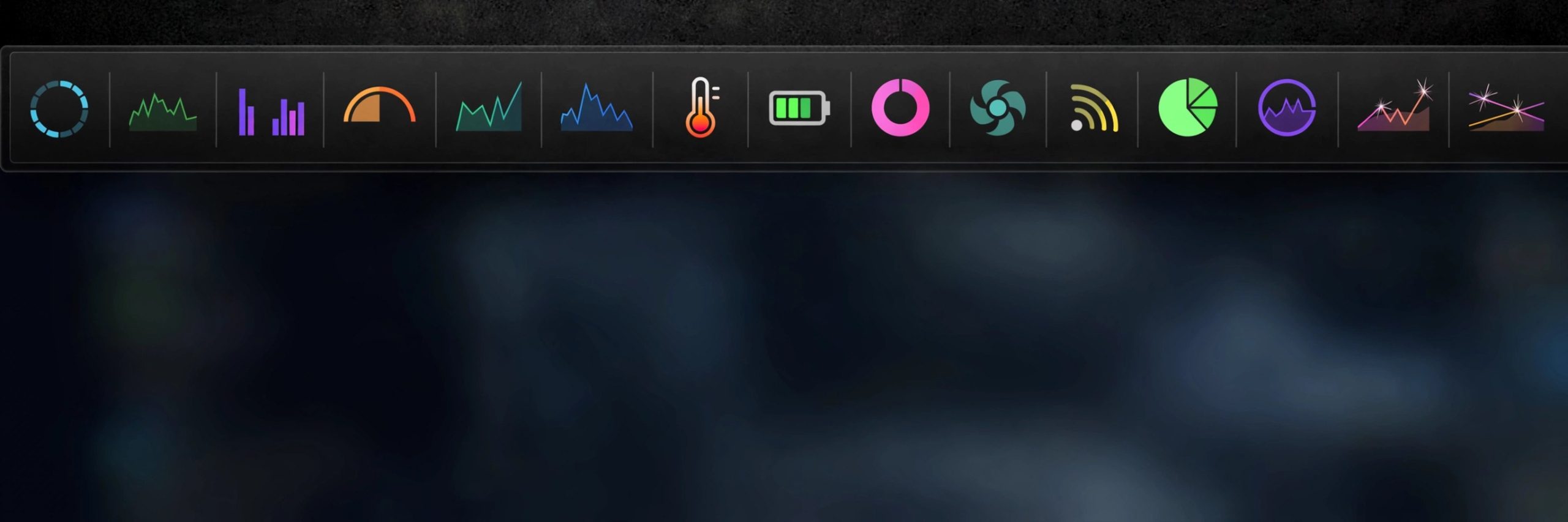
    Opening Activity Monitor every time your Mac feels slow gets old fast. MenuBar Stats gathers the numbers you actually check and parks them in the menu bar: CPU load, memory use, disk space, network speeds and battery state. Each stat lives in its own module, a click opens the detail view, and widgets plus Shortcuts actions carry the same readings further.

    Key Features

    • CPU module shows user, system and idle load along with uptime
    • Memory module breaks down wired, active, inactive and free RAM
    • Disk module tracks used and free space on your drives
    • Network module shows live upload and download speeds and IP addresses
    • Battery module reports charge state and health on Mac laptops

    How to Download

    1. Use the download button on this page to get the current build of MenuBar Stats.
    2. Open the package, move the app to your Applications folder and launch it.
    3. Open the preferences, choose which modules sit in the menu bar and set how often readings refresh.

    System Requirements

    MenuBar Stats runs on current versions of macOS and works on Apple Silicon and Intel Macs. It is a light app that lives in the menu bar and uses very few resources of its own.

    FAQs

    Which stats can I see at a glance?

    CPU, memory, disk, network and battery readings sit in the menu bar. Click any module for the deeper numbers behind the headline figure.

    Can I choose what appears in the menu bar?

    Yes. Modules can be turned on or off in the preferences, and you can set the refresh interval from every second to every thirty seconds.

    Can it free up memory too?

    The memory module includes a purge option that can release inactive memory when you ask it to, which can help when a big app has just closed.

  • Foldspace 1.4.0 for Mac

    Foldspace 1.4.0 for Mac

    Foldspace 1.4.0 for Mac

    Foldspace 1.4.0 for Mac

    Mac Utilities
    Updated Aug 14, 2026
    Mac Utilities • Updated Aug 14, 2026

    Folding a layer sounds simple, yet doing it well by hand in After Effects means masks and patient keyframe work. Foldspace is a plugin that takes on that chore. It folds layers through space so you can build folding cards, panels and transitions with real depth, and spend your time on timing and design instead of on rigging each fold.

    Key Features

    • Folds layers in a composition to create cards panels and folding transitions
    • Gives flat artwork a sense of depth as each fold turns through space
    • Saves the manual rigging work of masks nulls and repeated keyframes
    • Suits title sequences logo reveals and explainer scenes with a paper feel
    • Runs inside After Effects so it fits a standard motion graphics workflow

    How to Download

    1. Use the download button on this page to get the installer package for your Mac.
    2. Close After Effects, run the installer, and follow the steps shown on screen.
    3. Open After Effects, apply Foldspace to a layer, and shape the folds for your scene.

    System Requirements

    You need a Mac that runs a supported version of Adobe After Effects, plus enough memory and graphics power for smooth previews of layered scenes. As with any plugin, check the version notes for your After Effects release before installing a new build.

    FAQs

    Is Foldspace a standalone app?

    No. It is a plugin for After Effects, so it works inside your compositions and has no use outside the host application.

    What projects suit Foldspace best?

    It suits folding cards, opening panels, book style pages and transitions where flat layers need to turn and fold with depth.

    Do I still control the animation timing?

    Yes. The plugin handles the folding behaviour, while you stay in charge of when each fold starts and how the scene plays.